Scaling Search: Integrating Elasticsearch with Node.js
Data volume is the classic "good problem" to have, but it inevitably breaks traditional SQL query patterns. While relational databases remain the bedrock of application state, they often stumble when tasked with high-velocity, complex text searches—leading to the familiar bottleneck of slow, inaccurate results that frustrate end-users.
Elasticsearch fills this gap. It isn't a replacement for your primary database, but rather a powerful augmentation for text search and analytical operations. If you are running a Node.js backend and need a path toward sub-millisecond search latency without compromising on relevance, this guide outlines the integration process.
Prerequisites:
- A functional Node.js environment.
- Familiarity with standard backend patterns and CRUD operations.
The Fundamentals: What is Elasticsearch?
At its core, Elasticsearch is a search engine capable of advanced text and vector indexing. It is designed to process and analyze massive streams of data, powering features like full-text search, autocomplete, and search-driven analytics. Production-grade alternatives include Algolia, OpenSearch, and MeiliSearch, though Elasticsearch remains the industry standard for self-managed enterprise search.
Core Concepts for the Relational Developer
To leverage Elasticsearch effectively, you must map its terminology to familiar database concepts:
- Index: The equivalent of a database. It is a logical container for your data.
- Document: The smallest unit of storage, functioning like a row in a table or a BSON document in MongoDB.
- Mapping: The schema definition; it dictates how fields are stored and indexed.
- Score: A relevance metric calculated for search results.
- Analyzer/Tokenizer/Filter: The pipeline that converts raw text into structured tokens for indexing.
- Aggregator: A query-time tool for statistical analysis, similar to MongoDB’s aggregation framework.
- Bulk Indexing: An essential operation for migrating existing database records into the search engine in batches.
Getting Started
For development, we will utilize a local instance of Elasticsearch. You can deploy it via Windows archive, Linux/macOS binaries, or via Docker. Windows users should ensure they are executing the process with administrative privileges to avoid permission conflicts.
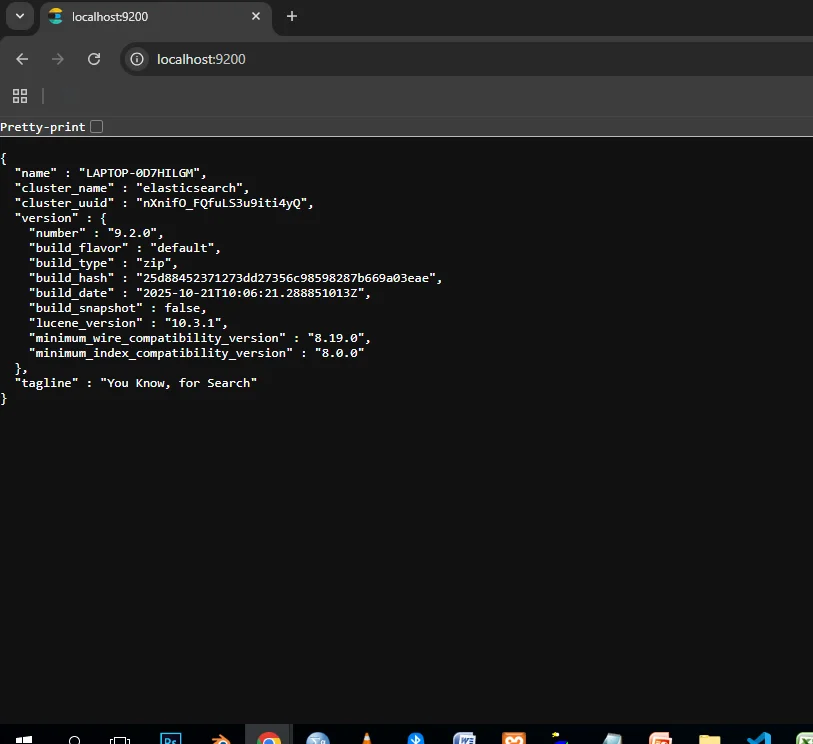
Once the engine is running, verify connectivity by hitting localhost:9200. A successful response should mirror the following output:
Project Context
We are integrating search into an existing forum application built on Node.js and Express. The project currently relies on MySQL as the source of truth, but we will introduce an Elasticsearch layer to handle indexing for our post and thread content.
Table of Contents
- What is Elasticsearch?
- Elasticsearch Key Terms
- How to Set Up Elasticsearch
- How to Set Up the Demo Project
- How to Set Up Elasticsearch in Your Project
- How to Work with Indexes in Elasticsearch
- Search Implementation
- Full Code
- Wrapping Up
- Conclusion
Implementation and Architecture
The provided implementation relies on the official @elastic/elasticsearch Node.js client. Security best practices are addressed through environment variables for credentials and a conditional TLS toggle—though be warned, explicitly disabling certificate verification for non-production environments is a convenience that frequently leads to "forgotten" security gaps in production.
const { Client } = require('@elastic/elasticsearch');
const esClient = new Client({
  node: 'http://localhost:9200',
  auth: {
    username: process.env.ELASTICSEARCH_USERNAME,
    password: process.env.ELASTICSEARCH_PASSWORD
  },
  maxRetries: 5,
  requestTimeout: 60000,
  tls: {
    rejectUnauthorized: process.env.NODE_ENV !== 'development'
  }
});
module.exports = esClient;
Effective search hinges on index design. The mapping below utilizes an edge_ngram filter to support autocomplete functionality, balancing search precision by separating the analyzer for indexing (n-grams) from the search analyzer (standard). Field definitions are strictly typed—integer IDs, keyword categories, and date fields—ensuring that ingestion logic and query execution remain performant.
const indexMapping = {
  settings: {
    analysis: {
      analyzer: {
        autocomplete: { type: 'custom', tokenizer: 'standard', filter: ['lowercase', 'autocomplete_filter'] },
        autocomplete_search: { type: 'custom', tokenizer: 'standard', filter: ['lowercase'] }
      },
      filter: {
        autocomplete_filter: { type: 'edge_ngram', min_gram: 2, max_gram: 10 }
      }
    }
  },
  mappings: {
    properties: {
      id: { type: 'integer' },
      title: { type: 'text', analyzer: 'autocomplete', search_analyzer: 'autocomplete_search', fields: { keyword: { type: 'keyword' }, standard: { type: 'text' } } },
      content: { type: 'text', analyzer: 'standard' },
      category: { type: 'keyword' },
      tags: { type: 'keyword' },
      author: { type: 'text', fields: { keyword: { type: 'keyword' } } },
      views: { type: 'integer' },
      published_at: { type: 'date' }
    }
  }
};
Managing the lifecycle of your data—from setup and indexing to deletion—requires robust error handling. The snippet below highlights the standard pattern for bootstrapping an index, while the transform logic acts as the bridge between your relational data source and the document-oriented structure expected by Elasticsearch.
const setupIndex = async () => {
  try {
    const indexExists = await esClient.indices.exists({ index: INDEX_NAME });
    if (indexExists) return console.log(`Index "${INDEX_NAME}" already exists`);
    await esClient.indices.create({ index: INDEX_NAME, ...indexMapping });
    console.log(`Index "${INDEX_NAME}" created`);
  } catch (err) { throw err; }
};

const transformPostToESDoc = (post) => ({
  id: post.id, title: post.title, content: post.body, author: post.author,
  category: post.category, tags: post.tags, views: post.views || 0, published_at: post.created_at
});
Query design is where Elasticsearch truly shines. The multi_match implementation below uses a "best_fields" type with fuzziness enabled, effectively boosting titles over content to prioritize relevance. Pagination is handled manually via from and size parameters.
const searchElastic = async (query, page = 1, size = 10) => {
  const result = await esClient.search({
    index: INDEX_NAME,
    from: (page - 1) * size,
    size,
    query: { bool: { must: [{ multi_match: { query, fields: ["title^3", "content"], type: "best_fields", fuzziness: "AUTO" } }] } }
  });
  return result.hits.hits;
};
Final Assessment
Elasticsearch remains the de facto standard for adding search capabilities to web applications because of its platform agnosticism and mature API. While this configuration provides a solid foundation, moving to a production environment requires more than just basic CRUD operations; you will eventually need to look toward the broader ELK stack (Elasticsearch, Logstash, Kibana) for observability and complex data visualization.
Performance expectations for modern web search are binary—it is either fast or it is broken. Implementing a dedicated engine like Elasticsearch is no longer optional for content-heavy applications. For those looking to dive deeper into broader integration strategies, further documentation can be found on this portfolio site.